Picking a call tracking platform is harder than it looks. Pricing models vary wildly, AI features range from genuinely useful to marketing fluff, and the right tool for a small business can be very different from the right platform for an enterprise revenue team. The 10 tools on this list all do call tracking, but they differ enormously in attribution depth, AI quality, agency support, and how their pricing behaves at scale.
We’ve spent the last decade building Nimbata, which means we’ve watched this category evolve from basic number-swapping to AI-driven revenue attribution and we’ve seen first-hand which tools live up to the pitch and which ones quietly fall apart at 5,000 calls a month. This guide is what we wish we’d had when we were evaluating options ourselves: honest assessments of who each tool is right for, what it actually costs, and where it falls short.
Full transparency before you read a single word:
We are Nimbata. We make call tracking software. We wrote this list. And yes, we put ourselves at number one.
If that’s enough for you to close this tab, we completely understand. But if you’re still here: we’ve genuinely tested all 11 tools, we’ve been honest about where competitors beat us, and we’ve tried to give you the clearest breakdown of the call tracking landscape that exists anywhere on the internet.
Not comparing tools at the moment? Try these instead:
- New to call tracking? → What Is Call Tracking? A Marketer’s Guide
- Want to understand DNI? → Dynamic Number Insertion Explained
- Agency? → Call Tracking for Agencies
- Need a cost estimation? → Nimbata Pricing Calculator
- Looking for Nimbata specifically? Visit our call tracking software page.
How we evaluated these tools
Every platform was assessed on the same seven criteria. We weighted them based on what matters most to the marketing teams and agencies who use call tracking in production, not just on a free trial.
| Criteria | What We Looked At |
| Attribution accuracy | Does it correctly match calls to the channel, campaign, and keyword that drove them? |
| Ease of setup | How quickly can a non-developer team go live? Is a script + tracking numbers enough? |
| AI & conversation intelligence | Quality of transcription, call scoring, sentiment detection, and automatic summaries. |
| Integrations | Native connections to Google Ads, Meta, HubSpot, Salesforce, and other common tools. |
| Pricing fairness | Is the model predictable? Per-call vs. per-minute makes a significant cost difference at volume. |
| Account structure & scalability | How flexible is the platform for complex account setups, multiple projects, locations, sub-accounts, and user seats? |
| Support quality | Real humans available? Response times, onboarding help, and documentation quality. |
The 10 best call tracking software for each use case [TL;DR]
| Use case | Best pick | Why it wins | Starts at (fee only) |
|---|---|---|---|
| Best overall for modern marketing teams | Nimbata | Strong attribution + AI scoring at a fraction of enterprise pricing | $39/mo |
| Best for SMBs running Google Ads | CallRail | Mature brand, easy setup, but pricier at scale | $55/mo |
| Best for inbound + outbound + texting | CTM | Hybrid contact center features in one tool | $79/mo |
| Best for high-volume call centers | Convirza | Speech analytics built for QA at scale | $29/mo |
| Best for European enterprises | Infinity | Strong UK/EU presence, deep telecom features | $249/mo |
| Best for conversation intelligence at the enterprise level | Invoca | Most mature AI signals, but priced for Fortune 1000 | Custom |
| Best for sentiment analysis on a budget | iovox | Lightweight AI tagging without enterprise overhead | $500/mo |
| Best for voice analytics in regulated industries | Marchex | Heavy in auto, healthcare, home services | Custom |
| Best for pay-per-call advertisers | Ringba | Built specifically for affiliate / PPCall buyers | $147/mo |
| Best for tracking calls + forms + chats together | WhatConverts | Unified lead source reporting across channels | $30/mo |
Looking for an agency-specific deep dive? Compare the best call tracking software for agencies →
The 10 best call tracking software companies [In detail]
Call tracking software may have a similar look and feel at first glance, but the strengths and weaknesses of each tool make a massive difference. No one call tracking tool does it all, but a well-designed and structured call tracking platform should help you achieve your goals.
1. Nimbata — best overall for marketers
Best for: Agencies and marketers needing accurate attribution, predictable pricing, and built-in AI without enterprise complexity (or pricing).
Overview
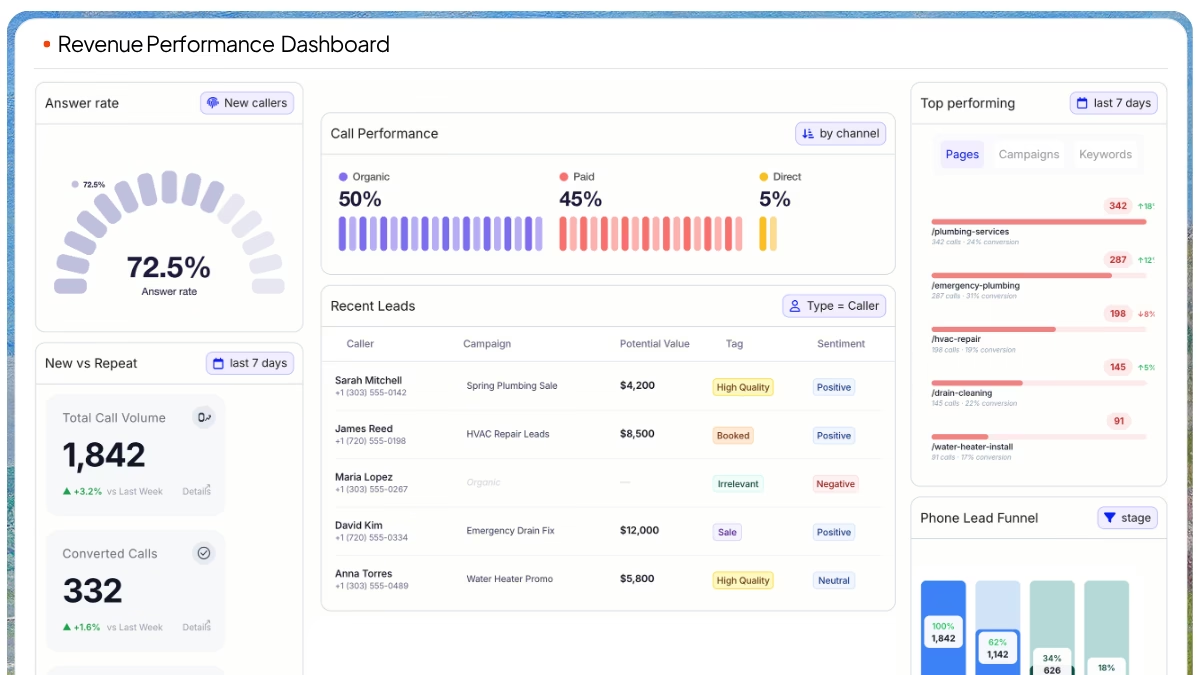
Nimbata is a call tracking platform built for marketers who need to attribute phone leads to specific campaigns, keywords, and landing pages, and then push that data into ad platforms, CRMs, and BI tools. It supports dynamic number insertion, AI-powered call scoring, custom AI fields you can prompt yourself, and native integrations with Google Ads, GA4, Meta, HubSpot, and Salesforce.
Key features
- Dynamic Number Insertion (DNI) at session and visitor level
- AI Custom Fields — write your own prompts to extract data from calls (lead score, product interest, qualification status)
- AI call summaries and transcription in 25+ languages
- Native integrations with Google Ads, GA4, HubSpot, Salesforce, Pipedrive, Slack, and Zapier
- Workflow Builder for routing calls and triggering automations
- White-label dashboards for agencies managing multiple clients
- HIPAA-compliant tier for healthcare and legal verticals
Standout capability
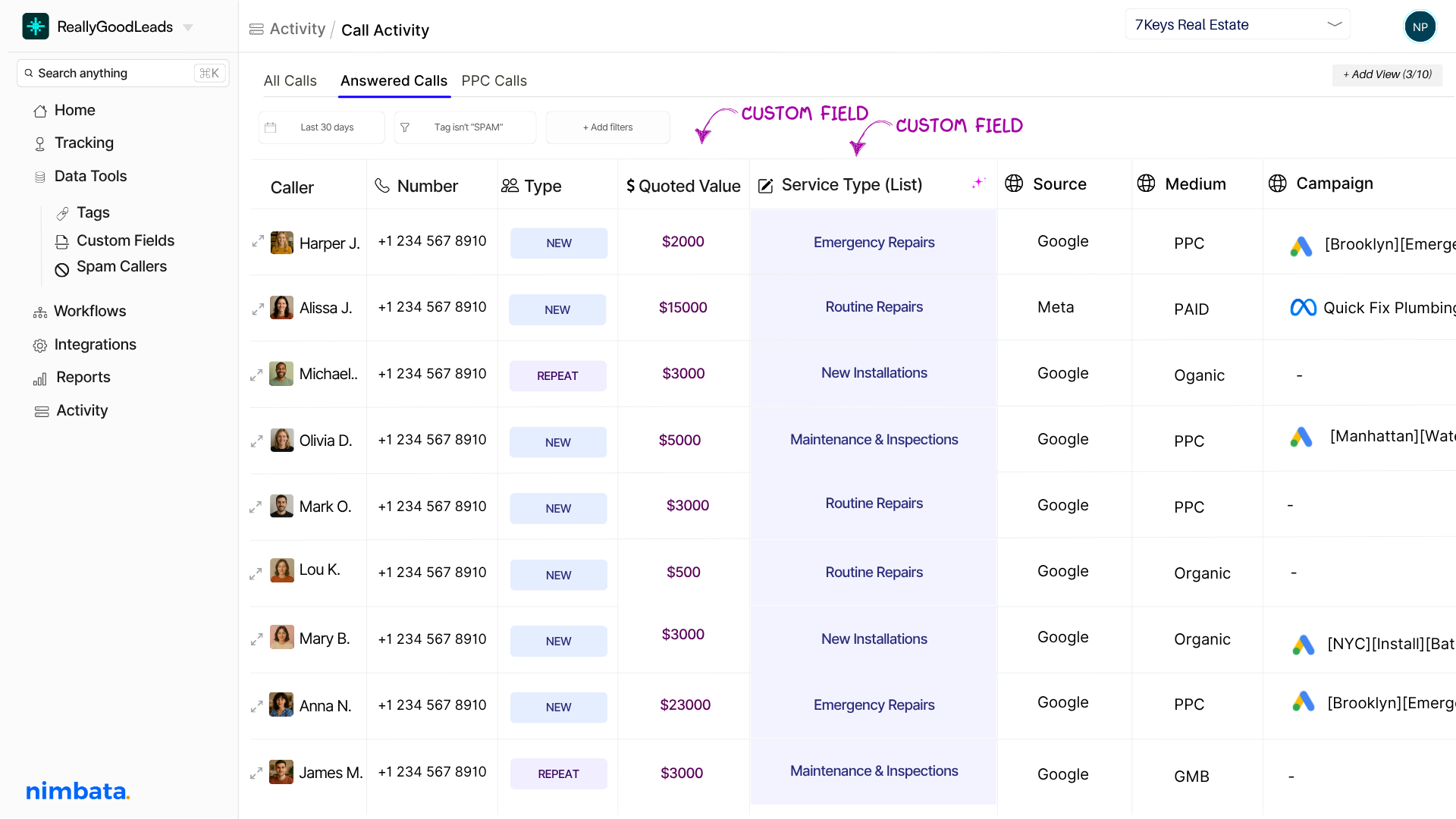
AI Custom Fields.
Most call tracking tools give you a fixed set of AI tags (“converted”, “qualified”, “spam”). Nimbata lets you write the prompt yourself, extract product interest, urgency, the rep’s tone, anything that matters to your funnel, and pipe that into your CRM as a structured field. That flexibility is particularly useful when businesses have custom qualification criteria that don’t fit a fixed taxonomy.
Pros
- Pricing significantly below CallRail and CallTrackingMetrics for similar feature depth
- Customizable, white-label dashboards
- AI Custom Fields are genuinely differentiated
- Customer support consistently ranked #1 on G2 in this category
- Transparent number and minute pricing, no per-feature paywalls
Cons
- Smaller brand recognition than CallRail (which can matter when stakeholders are involved in the buying decision)
- Outbound calling is functional but not the focus, sales teams that live in a softphone may want CloudTalk alongside it
- Pre-built reporting templates are fewer than other vendors (though the dashboard is more customizable)
| Pros | Cons | Best Features |
| ✅ Easy-to-use interface with quick setup | ❌ Advanced features (AI + workflows) can require initial setup time | Call Tracking & Attribution: Connect calls to campaigns, keywords, and channels |
| ✅ Strong call tracking + attribution capabilities | ❌ Learning curve for fully leveraging automation and AI capabilities especially when businesses don’t have clear goals | AI Call Analysis: Automatically tags, scores, and summarizes calls |
| ✅ AI-powered features (AI Tags, Notes, Rating, Value) save time and improve insights | Number Pool Calculator: Estimates exactly how many tracking numbers you need across all traffic or per channel. | |
| ✅ Built for agencies and service-based businesses | DNI Checker: Automatically checks the DNI status and informs user when something breaks | |
| ✅ Workflow automation (Workflow Builder) reduces manual work | No-code workflow builder: Drag and drop criteria and action to create smooth automations. | |
| ✅ Integrates well with marketing tools (Google Ads, analytics platforms, etc.) | Email Summaries: Alerts on call performance daily, weekly, monthly. | |
| ✅ Clear visibility into which campaigns drive calls | Manager Account: Feature for Agency Partners to handle their clients’ accounts. | |
| ✅ Offers expert support and resolves issues fast | ||
| ✅ Pay per call usage pricing instead of per minute |
Nimbata Pricing
Nimbata offers flexible pricing to support businesses of all sizes, starting with a free entry-level plan and scaling up based on features and usage.
| Plan’s Name: | Entry | Pro | Marketing | Agency |
| Fee (monthly) | $0 | $39 | $89 | $149 |
| Best for: | Basic call tracking plan to get started with one user and one project. | Growing businesses that need reporting, integrations & automation | Marketing teams & agencies scaling campaigns | Agencies managing multiple clients & high call volumes |
Nimbata uses a subscription + usage-based pricing model, where you pay a monthly fee plus costs for tracking numbers and answered calls.
Unlike most competitors, Nimbata charges per answered call—not per minute, meaning you only pay for actual leads, not call duration. This makes pricing more predictable and cost-efficient, especially for businesses handling longer or high-volume calls
Note: Pricing refers to base license costs; additional usage fees apply.
See our detailed pricing and use our pricing calculator to get your exact pricing quote.
Verdict
If you want one tool that handles attribution, AI scoring, and CRM sync — and you don’t want to pay enterprise prices for it — Nimbata is the most well-rounded option in this list.
2. CallRail: for analyzing call data
Best for: SMBs and agencies wanting accessible call intelligence without enterprise-level tools.
Overview
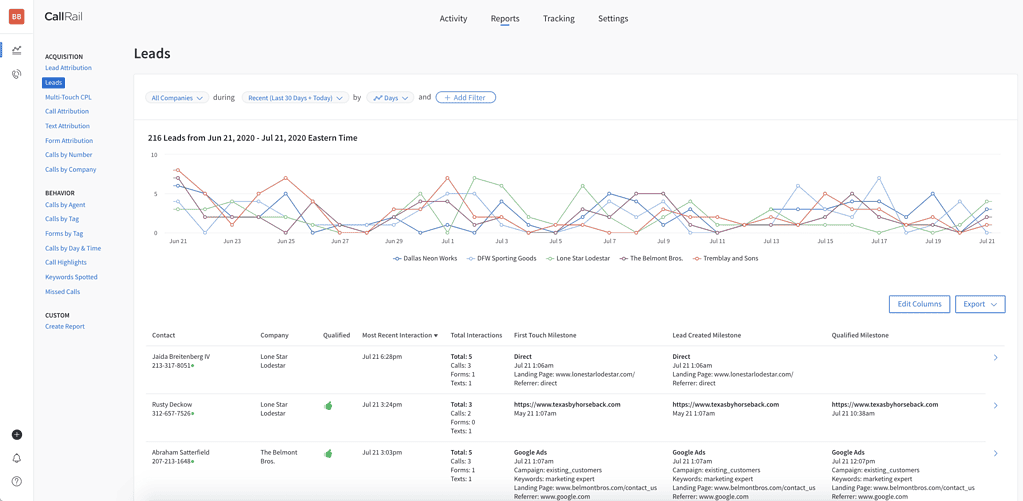
CallRail is the most-recognized name in call tracking. Founded in 2011, it covers call tracking, form tracking, conversation intelligence (its AI add-on), and lead center. It has the deepest brand presence with Google Ads agencies and SMBs in the US.
Key features
- DNI for keyword and source-level attribution
- Conversation Intelligence (AI transcription, summaries, automation rules) as a paid add-on
- Form tracking
- Native Google Ads, GA4, HubSpot, Salesforce integrations
- Voice assist for busy teams
Standout capability
Brand maturity. CallRail has been integrated into more agency stacks than any other tool here, which means stakeholders rarely push back when you propose it. Its Google Ads integration is also the most battle-tested.
Pros
- Easy setup: most users are tracking calls the same day
- Mature ecosystem with hundreds of native integrations
- Reliable for the core attribution use case
- Strong onboarding documentation and a large community
Cons
- Pricing escalates fast, every meaningful feature (AI, form tracking, more numbers) is on a higher tier or an add-on
- AI features are an extra $50–$100/mo on top of base plans
- The dashboard hasn’t kept pace with newer competitors (CTM and Nimbata are more flexible)
- Limited customization for agencies running multiple client brands
Callrail overview
| Pros | Cons | Best Features |
| ✅ Easy to use, intuitive interface (fast onboarding for teams) | ❌ Pricing can get expensive as usage scales (numbers, minutes, add-ons) | Call tracking & attribution (campaign, keyword, source-level tracking) |
| ✅ Powerful call tracking and detailed analytics for marketing ROI | ❌ Limited integrations or unreliable syncing with some tools | Conversation intelligence (AI transcription, summaries, call scoring) |
| ✅ Strong reporting on lead sources (PPC, SEO, offline campaigns) | ❌ Learning curve due to feature depth and data volume | Call routing & automation (round robin, skills-based routing) |
| ✅ Call recording & call management tools improve sales and QA | ❌ Reporting can feel limited or overwhelming depending on use case | Multi-channel tracking (calls + forms + basic lead tracking) |
| ✅ Integrates with major tools (Google Ads, HubSpot, Salesforce, GA) | ❌ Limited international coverage (mainly US, CA, UK, AU) | Integrations + API + Zapier connectivity |
| ❌Customer support and mobile experience can be inconsistent | ||
CallRail Pricing
CallRail offers four main plans, each billed monthly plus usage fees for minutes and numbers.
| Plan’s Name: | Lead Tracking | Lead Tracking Complete | Lead Conversion | Call Tracking Lead Conversion Complete |
| Fee (monthly) | $50/month +usage | $195 +usage | $150 + usage | $195 + usage |
| Best for: | For small businesses or solo marketers who just need to know which ads and keywords drive their phone calls. | For marketers running both calls and forms who need full attribution across every inbound lead source. | For sales-driven teams who want AI to analyze call content, surface trends, and coach reps to close more leads. | For growth teams who want the full stack, track every lead, attribute every source, and use conversation AI to convert more of them. |
CallRail uses a subscription + usage-based pricing model, where you pay a base monthly fee plus additional costs for call minutes, tracking numbers, and features like SMS or AI.
Add-ons like conversation intelligence or voice assistants are billed separately, further increasing the overall cost.
3. CallTrackingMetrics
Best for: Teams that need call tracking and contact center features (outbound dialing, SMS, IVR) without buying two tools..

CallTrackingMetrics blends call tracking and a lightweight contact center in a single platform. You get DNI, attribution reporting, and AI scoring plus outbound calling, IVR, smart routing, and SMS. That makes it more powerful than CallRail for teams that need both, but also more complex.
Strengths
- Unlimited users across all plans
- Unified tracking for inbound and outbound calls
- Powerful routing, queues, coaching, and monitoring tools
Considerations
- Higher learning curve compared to simpler tracking platforms
- Automation and AI features live in higher-tier plans
- Costs escalate quickly for advanced functionality or heavy usage
Key features
- DNI and source-level attribution
- Built-in softphone, outbound dialing, SMS
- IVR, call routing, queues
- AskAI conversation intelligence (paid add-on)
- Form tracking and chat-to-call
Standout capability
Hybrid contact center features. CTM is one of the only tools in this list where you can replace both your call tracking software and your basic outbound dialer.
Pros
- Most feature-rich platform on this list
- Powerful workflow and routing logic
- Strong reporting customization
- Broad integration library
Cons
- Steep learning curve, onboarding can take weeks
- UI feels dated compared to newer entrants
- AI is a paid add-on; pricing climbs fast with feature stacking
- Overkill for teams that only need attribution
CallTrackingMetrics Pricing
CallTrackingMetrics offers four plans billed annually, with additional usage fees based on minutes and numbers.
| Plan’s Name: | Marketing Lite | Marketing Pro | Sales Engage | Enterprise |
| Fee (monthly) | $79/mo + usage | $179/mo + usage | $329/mo + usage | $1,999/mo + usag |
| Best for: | Small businesses that need basic call tracking & attribution | Adds conversation intelligence, automation, and agency-friendly features. | A full suite built for sales teams that manage inbound and outbound calls. | Customizable, enterprise-grade features with dedicated support and advanced scalability. |
Want to explore CTM further? See our CTM pricing guide, our CallRail vs CallTrackingMetrics comparison, or our CTM alternatives roundup.
Verdict
Pick CTM if you specifically need both call tracking and a softphone in one tool. If you only need attribution, it’s more than you’re paying for.
4. Convirza
Best for: Multi-location businesses and call centers that need to score thousands of calls per month for QA, agent coaching, and lead quality.

Convirza is one of the older speech analytics platforms in the space, built around the idea that the value of a call lives in its content, not just its attribution. Its scorecards and AI evaluation are battle-tested in industries like home services, healthcare, and franchises.
Key features
- AI scorecards (configurable per industry)
- Speech analytics and keyword spotting
- Multi-location and franchise reporting
- Attribution reporting (paid plans)
- API access for custom workflows
Standout capability
Configurable scorecards. If you need every call evaluated against the same rubric across hundreds of locations, Convirza is purpose-built for it.
Pros
- Mature speech analytics
- Strong reporting for franchise and multi-location
- Good fit for QA-heavy workflows
Cons
- Pricing is opaque, quote-only
- UI feels dated
- Overbuilt for SMBs that just need attribution
- Setup and onboarding takes time
Convirza Pricing
Convirza offers four main plans, each with additional per-number and per-minute usage fees.
The table below included the plans under Call Tracking.
| Plan’s Name: | Starter | Agency |
| Fee (monthly) | $29/mo + usage | $149/mo + usage |
| Best for: | Entry-level call tracking for small teams. | Designed for agencies managing multiple clients. |
Verdict
Convirza is purpose-built for QA at scale. If you don’t need that, you’re paying for capacity you won’t use.
See our Convirza alternatives comparison if you’re evaluating options.
5. Infinity: for handling high volume of phone calls
Best for: UK and EU-based enterprises that handle large call volumes and need a vendor with strong local presence and GDPR-first design.

Infinity is a UK-headquartered call tracking and conversation analytics platform with deep telecom roots. It’s a popular choice with European agencies and enterprises that prefer a regional vendor for compliance and support.
Key features
- DNI and visitor-level attribution
- Conversation Analytics with Smart Match scoring
- Multi-channel reporting
- GDPR-first data handling
- Strong reporting and BI integration
Standout capability
European data sovereignty and telecom expertise. If your team needs European data residency and EU-region support, Infinity is built for that.
Pros
- Strong UK / EU presence and support
- Mature conversation analytics
- Reliable for high call volumes
Cons
- Pricing is opaque — quote-based, mid-to-enterprise tier
- Less Google Ads-native than CallRail or Nimbata
- Smaller integration library than US competitors
Infinity Pricing
Infinity offers three main plans, each with additional per-call usage fees. Pricing is listed in GBP (£); USD equivalents vary.
| Plan’s Name: | Essentials | Pro |
| Fee (monthly) | $249/mo + usage | $349/mo + usage |
| Best for: | Core call tracking and attribution for small teams | Enhanced features, support, and analytics for growing businesses. |
For Enterprises there’s an option for Custom pricing that includes:
Advanced analytics, custom integrations, and global scalability. Usage: From ~£0.07 per call at higher volumes (plus telecom fees)
Verdict
Strong regional pick for the UK and EU. Outside those markets, US-headquartered competitors usually offer better value.
See our Infinity alternatives comparison for context.
6. Invoca
Best for: Fortune 1000 brands with enterprise budgets that need the most mature AI-powered conversation intelligence on the market.

Invoca is the category leader in enterprise conversation intelligence. It’s used by major auto, healthcare, finance, and home services brands that need AI to surface revenue signals from millions of calls per year.
Key features
- Signal AI for outcome detection (sale, no-sale, appointment, etc.)
- Real-time call signals into ad platforms and CRMs
- Custom signals trained on your business outcomes
- Enterprise-grade integrations (Adobe, Salesforce, Tealium)
- HIPAA, PCI, SOC 2 compliance
Standout capability
Custom Signal AI. You can train Invoca to detect outcomes specific to your business — and use those signals to optimize ad bidding in real time. No other tool in this list does that at the same depth.
Pros
- Best-in-class AI for the enterprise tier
- Real-time signals into Google Ads, Meta, and DSPs
- Strong compliance posture
- Mature integrations with enterprise martech
Cons
- Pricing starts in the $1,000+/mo range — typical contracts are mid-five figures annually
- Implementation requires a dedicated team
- Overkill for SMBs and most agencies
Invoca Pricing
Custom only. Annual contracts. See our Invoca alternatives comparison if Invoca is out of budget.
Verdict
Best AI in the category — at a price that only enterprises can justify. If you’re not Fortune 1000, you can keep reading this article.
7. iovox
Best for: Mid-market businesses and marketplaces that need solid sentiment and topic detection without enterprise pricing.

Iovox is a UK-based call tracking platform that puts sentiment analysis and AI-powered topic detection at the center of its product. Popular with online marketplaces and classifieds.
Key features
- Sentiment analysis on every call
- Topic detection and conversation tagging
- Numbers in 80+ countries
- API-first architecture
- Lead qualification scoring
Standout capability
Sentiment as a first-class metric. Most tools treat sentiment as one tag among many; iovox builds reporting around it.
Pros
- Sentiment and topic detection are well-implemented
- Strong international number coverage
- API-first for custom builds
Cons
- Pricing is opaque
- Smaller US presence than CallRail or CTM
- Native marketing platform integrations are thinner
iovox Pricing
iovox offers two main plans, each with additional usage-based charges.
| Plan’s Name: | Professional | Enterprise |
| Fee (monthly) | $500/mo + usage | $2000/mo + usage |
| Best for: | Full call tracking and analytics platform with extensive features. | Solution for large organizations, global operations, and white-label/high-volume needs. |
See our iovox alternatives comparison for options that may fit better your business.
Verdict
Worth shortlisting if sentiment analysis is your top priority. For broader marketing attribution, the marketing-first tools cover more ground.
8. Marchex: for improving customer experience
Best for: Mid-market and enterprise teams in auto, healthcare, home services, and finance that need conversation intelligence to improve customer experience.
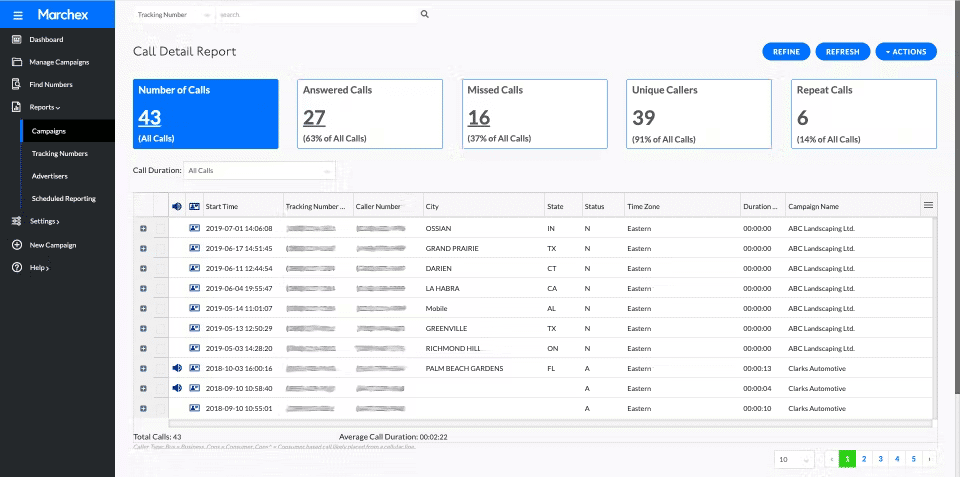
Marchex is a long-standing player with deep traction in vertical industries. Its conversation intelligence product is purpose-tuned for use cases like auto dealership lead handling and home services appointment-setting.
Key features
- Vertical-specific AI models (auto, home services, healthcare)
- Marchex OneStack platform — call tracking + analytics + AI
- Real-time signals into ad platforms
- Strong customer experience reporting
Standout capability
Vertical AI. Marchex has decades of training data in specific industries — meaning its call categorization is more accurate out of the box for those verticals than generic AI tools.
Pros
- Strong vertical-specific AI accuracy
- Good for compliance-heavy industries
- Mature reporting
Cons
- Pricing is enterprise-tier and quote-based
- Less flexible for general-purpose marketing teams
- UI hasn’t aged as gracefully as newer tools
Marchex pricing
Custom only. See our Marchex alternatives comparison.
Verdict
If you’re in one of Marchex’s target verticals, the vertical AI gives you a head start. If not, it’s a more generic enterprise tool than its competitors.
9. Ringba
Best for: Pay-per-call publishers, affiliate networks, and advertisers who buy and sell calls as a product.

Ringba is the dominant platform in the pay-per-call ecosystem. It’s purpose-built for buying, routing, and selling phone calls, a different use case than the marketing attribution tools above.
While Ringba receives positive feedback for its reporting overall, some G2 reviewers have flagged limitations around reporting automation and maintaining reporting continuity when campaign or target names change. G2 currently lists “Inaccurate Reporting” among Ringba’s reported disadvantage. Reviewers also mention “Limited Options”, particularly around some extended features, with some users saying they need workarounds for specific requirements.
Key features
- Real-time bidding for calls
- Advanced routing logic (geo, time-of-day, caller history)
- Buyer / publisher workflows
- Detailed financial reporting (revenue per call, payouts)
- API for custom integrations
Standout capability
Real-time call auctions. Ringba’s RTB-style routing is unique in the call tracking space and core to how pay-per-call networks operate.
Pros
- Best-in-class for pay-per-call use cases
- Powerful routing engine
- Strong G2 reviews from its core audience
Cons
- Wrong fit for most marketing teams — it’s a marketplace tool, not an attribution tool
- Per-call usage fees can add up quickly
- AI and conversation intelligence are limited compared to marketing-focused tools
Ringba Pricing
Ringba offers tiered pricing with base monthly subscription + usage-based fees.
| Plan’s Name: | Business | Professional | Custom |
| Fee (monthly) | $147/mo + usage | $297/mo + usage | Custom pricing + usage |
| Best for: | Base plan for performance campaign tracking and call routing | Enhanced routing, white label, more advanced features for agencies & pay-per-call networks. | Fully tailored plan with custom tracking rates, unlimited numbers, real-time bidding, dedicated CSM. |
Verdict
If you’re a pay-per-call buyer or seller, Ringba is the obvious pick. For marketing attribution use cases, look at the other nine tools.
10. WhatConverts
Best for: Marketing teams and agencies that want every lead source – call, form, chat, e-commerce – in a single attribution view.

WhatConverts unifies call, form, chat, and e-commerce lead capture under one reporting layer. Its strength is treating every lead, regardless of channel, as a comparable, attributable unit.
Key features
- Call tracking with DNI
- Form tracking and chat tracking
- Lead qualification and quotable values
- Native integrations with Google Ads, GA4, Meta, HubSpot, Salesforce
- Agency dashboards and white-label reporting
Standout capability
Multi-channel lead unification. If you don’t want to bolt together two or three tools to track calls, forms, and chats, WhatConverts handles all of it natively.
Pros
- Cleanest multi-channel lead reporting in this list
- Affordable entry pricing
- Strong G2 ratings
- Good fit for agencies
Cons
- AI / conversation intelligence is thinner than CallRail or Nimbata
- Per-feature pricing climbs as you add forms or chat tracking
- Outbound calling not supported
What Converts Pricing
WhatConverts offers multiple tiered plans for single accounts and agency accounts, each with usage-based additions.
FOR INDIVIDUAL BUSINESSES
| Plan’s Name: | Call Tracking | Plus | Pro | Elite |
| Fee (monthly) | $30/mo + usage | $60/mo + usage | $100/mo + usage | $160/mo + usage |
| Best for: | Entry-level plan for tracking phone calls and texts. | Tracks calls, forms, and chats; adds campaign & keyword reporting. | Includes advanced tracking flows, report builder, HIPAA/GDPR compliance. | Full-feature tier with customer journey view, multi-click attribution, lead intelligence. |
See our WhatConverts alternatives comparison for context.
Verdict
The right call if you want one attribution tool for calls, forms, and chats — and don’t need deep conversation intelligence. If AI is the priority, look at Nimbata or CallRail.
How to choose the right call tracking tool for your business
Pricing pages are where call tracking comparisons go to die. Five questions cut through the noise:
1. What’s your real call volume, and what will it be in 12 months?
Most pricing scales by minutes and numbers. A tool that’s $30/mo at 200 calls it can be $400/mo at 5,000 calls. Project forward and ask each vendor for a 12-month total cost, not just the headline plan.
2. Inbound marketing attribution, outbound sales calling, or both?
If your priority is marketing attribution (which campaign drove the call?), pick a marketing-first tool – Nimbata, CallRail, WhatConverts. If your priority is outbound sales productivity (the team lives in a softphone), pick a VoIP-first too. CTM is one of the few that does both, but you pay for it.
3. How much do you actually need from AI?
Almost every vendor has an “AI” badge, what they actually deliver varies wildly. Ask for sample AI output on real calls (not the demo data). Test summary accuracy, intent detection, and false-positive rates. Our AI call tracking guide covers what to look for.
4. Which integrations are non-negotiable?
Native integrations behave differently than Zapier-mediated ones. If Google Ads, HubSpot, or Salesforce sync needs to be real-time and bidirectional, confirm native support before signing.
5. Do you need to manage multiple accounts, locations, or users?
f you’re managing a more complex setup, look for flexible account structures, multiple projects or sub-accounts, customizable user access, and scalable reporting. If you’re choosing software for an agency, see our guide to call tracking software for agencies for a closer look at the capabilities that matter most.
What features should you look for in call tracking software?
Call attribution
- source
- campaign
- keyword
- landing page
- visitor/session
Tracking numbers
- Global numbers
- local vs toll-free
- number pools
- number portability
Call analytics
- recordings
- transcripts
- duration
- caller information
- missed/answered calls
Lead quality
- qualified vs unqualified
- conversion status
- call tags
- lead scoring
- revenue/value
AI
- transcription
- summaries
- sentiment
- intent
- custom AI fields
- automated classification
Integrations
- Google Ads
- GA4
- Meta
- HubSpot
- Salesforce
- CRM/API
Workflow automation
- notifications
- routing
- CRM updates
- conversion events
- automated lead handling
Takeaway
There isn’t one call tracking platform that’s right for everyone. The best choice depends on how you generate leads, how much call volume you handle, which integrations you need, and how deeply you want to analyze conversations.
For simple attribution, prioritize ease of setup and predictable pricing. For deeper lead intelligence, look for AI-powered analysis and CRM integrations. For high-volume or complex calling environments, routing and contact-center capabilities may matter more..
Before you sign, take full advantage of free trials or free plans, and always book a 1:1 demo. This is your chance to test its interface, responsiveness, pricing, and compatibility with your call volume.
Frequently asked questions about best call tracking software
The best call tracking software depends on what you need to measure. If you mainly want to connect phone calls to marketing campaigns, look for accurate call attribution, dynamic number insertion, and integrations with platforms such as Google Ads and GA4. If you also want to understand lead quality, prioritize call recording, transcription, AI analysis, and CRM integrations.
Call tracking software typically combines a monthly subscription with usage-based costs. Depending on the platform, you may pay for tracking numbers, minutes, calls, or additional features such as conversation intelligence. Entry-level plans can cost less than $50 per month, while advanced and high-volume platforms can cost several hundred dollars or more.
When comparing prices, look beyond the advertised monthly fee and estimate the total cost based on your expected call volume and number of tracking numbers.
At minimum, look for accurate marketing attribution, dynamic number insertion, call recording, useful reporting, and integrations with the tools you already use. If you need to measure lead quality rather than just call volume, look for features such as call transcription, AI analysis, lead scoring, custom call tags, and CRM or revenue integrations.
Pricing structure and scalability also matter. A platform that looks inexpensive at low volume can become significantly more expensive as your call volume grows.
Yes. Many call tracking platforms can connect phone calls to Google Ads campaigns and send qualified calls back to Google Ads as conversion events. Depending on the platform and setup, you may be able to attribute calls to campaigns, ad groups, keywords, search terms, and landing pages.
When evaluating a platform for Google Ads, check whether the integration supports the conversion data and attribution level you need rather than simply looking for a “Google Ads integration.”
Yes. More advanced call tracking platforms can go beyond measuring how many calls a campaign generates and help determine which calls were actually valuable.
Depending on the platform, this can include call duration, call tags, transcription, AI-powered classification, lead scoring, conversion status, or CRM data. This allows marketers to optimize campaigns based on qualified leads rather than simply total call volume.
Some platforms can connect call data with CRM and sales data to help businesses understand which marketing sources generate revenue, not just calls.
For example, a call can be attributed to a Google Ads campaign, matched with a CRM record, and connected to a later sales outcome. This creates a clearer picture of the path from marketing spend to phone lead to revenue.
No. Call tracking can be valuable even when phone calls are a smaller part of your lead volume. The key question is whether phone leads represent a meaningful part of your marketing or sales activity.
If calls can lead to appointments, purchases, bookings, or other high-value outcomes, understanding which campaigns generate those calls can be useful even at relatively low call volumes.