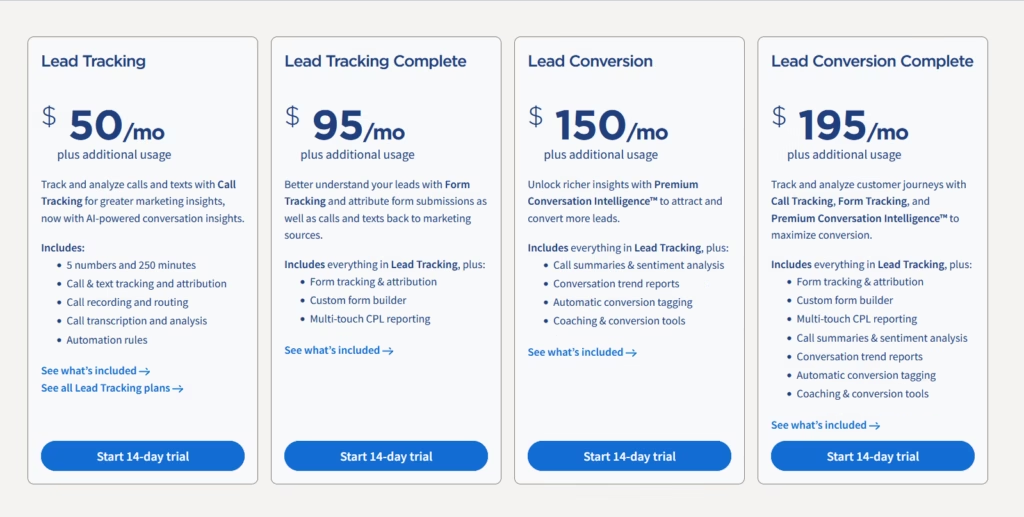
CallRail pricing starts at $50/month and runs across four plans: Lead Tracking ($50/mo), Lead Tracking Complete ($95/mo), Lead Conversion ($150/mo), and Lead Conversion Complete ($195/mo), all billed on top of usage fees for extra minutes and tracking numbers. Annual billing saves up to 10%, and there’s a 14-day free trial but no free plan. CallRail costs more than most call tracking tools with similar features, so it’s best suited to teams that specifically need its AI Conversation Intelligence.
If you’re comparing CallRail pricing, the headline number is only part of the story.
CallRail’s plans currently range from $55/month to $195/month when billed monthly, or from $50/month to $195/month on annual billing, depending on the plan. Every plan includes 5 local tracking numbers and 250 local minutes, with additional charges for extra numbers, minutes, toll-free numbers, SMS, forms, and certain AI or transcription usage.
CallRail also offers a 14-day free trial with no credit card required and does not offer a permanent free plan.
But which plan do you actually need? And what will CallRail cost once you factor in your call volume?
This guide breaks down every CallRail plan, its features, additional usage costs, real-world pricing examples, and how CallRail costs compares with alternatives.
Pricing note: Prices and included usage can change. The prices in this guide were checked against CallRail’s public pricing information in September 2026. Always verify the final price before purchasing.
CallRail pricing at a glance
| CallRail plan | Monthly price | Annual-billing price | Included numbers | Included local minutes | Included form submissions | Included analysis minutes |
|---|---|---|---|---|---|---|
| Lead Tracking | $55/mo | $50/mo | 5 | 250 | — | — |
| Lead Tracking Complete | $105/mo* | $95/mo* | 5 | 250 | 1,000 | — |
| Lead Conversion | $165/mo* | $150/mo* | 5 | 250 | — | 10,000 |
| Lead Conversion Complete | $215/mo* | $195/mo* | 5 | 250 | 1,000 | 10,000 |
*CallRail’s current public pricing page displays the annual-billing figures as $50, $95, $150, and $195 respectively; monthly pricing is shown as $55, with the page indicating that annual billing can save up to 10%. Verify the monthly figure for each tier at checkout because CallRail’s pricing display is dynamic.
The short version
- Lead Tracking: Best if you mainly need call tracking, call attribution, recording, routing, transcription, and basic automation.
- Lead Tracking Complete: Best if you need to track calls and forms together and report on multi-touch cost per lead.
- Lead Conversion: Best if you need Premium Conversation Intelligence, including AI summaries, sentiment analysis, conversion tagging, and coaching tools.
- Lead Conversion Complete: Best if you need both form tracking and Premium Conversation Intelligence.
The important thing to understand is that moving up a plan doesn’t primarily give you more call volume. All four plans include the same 5 local numbers and 250 local minutes. Higher tiers mainly unlock additional functionality.
How does CallRail pricing work?
CallRail uses a subscription + usage pricing model, where anything beyond your plan’s included numbers and minutes is billed as additional usage.
You pay:
Total invoice = Monthly plan fee + additional usage
The base plan includes a set amount of tracking numbers, minutes, texts, forms, or analysis depending on the plan. If your account exceeds the included allowance, additional usage is billed separately.
For the US pricing shown publicly by CallRail, the additional usage rates include:
| Usage | Additional cost |
|---|---|
| Local tracking number | $3/month |
| Local minute | $0.06/minute |
| Toll-free tracking number | $5/month |
| Toll-free minute | $0.08/minute |
| SMS | $0.03/message |
| Form submission | $0.02/submission |
| Analysis minute | $0.05/minute |
CallRail also lists call transcription as included within its local-minute allowance, with separate transcription pricing shown in its detailed pricing display depending on the plan and billing configuration.
One important detail: CallRail rounds calls up
CallRail states that minutes are calculated by rounding each call up to the nearest minute and then summing the minutes. That means a call lasting 1 minute and 10 seconds can consume 2 billable minutes.
This matters when you’re estimating your real monthly cost.
Does CallRail have a free plan?
No. CallRail does not offer a permanent free plan.
It offers a 14-day free trial, and CallRail states that no credit card is required to start the trial. After the trial, you choose a paid plan.
This is different from some competitors that offer free tiers or pay-as-you-go options.
CallRail pricing plans explained
The easiest way to choose CallRail is to look at the plans by the problem they solve.
1. Lead Tracking plan: $55/mo + additional usage
Best for: Basic call tracking and marketing attribution
Lead Tracking is CallRail’s entry-level plan. It’s designed for businesses that want to know which marketing activities generate phone calls without needing the more advanced form tracking or conversation intelligence features.
Features included in Lead Tracking plan
Includes:
- 5 local tracking numbers
- 250 local minutes
- 25 text messages
- Call tracking
- Text tracking
- Marketing attribution
- Call recording
- Call routing
- Call transcription
- Call analysis
- Automation rules
- Dynamic number insertion
- Visitor-level tracking
- Marketing source attribution
- Reporting and analytics
- Integrations with marketing and business tools
Who is Lead Tracking plan for?
This plan is suitable for those who want to better understand where their calls are coming from and have some basic call reporting capabilities.
Who should choose Lead Tracking?
Choose this plan if:
- You primarily generate leads through phone calls.
- You want to know which ads, campaigns, or channels generate calls.
- You need call recording.
- You want call transcription without the full Premium Conversation Intelligence package.
- You don’t need form tracking.
- You don’t need advanced AI conversation analysis.
2. Lead Tracking Complete plan: $105/mo + additional usage
Best for: Businesses tracking calls and forms together
Lead Tracking Complete adds Form Tracking to the core CallRail tracking functionality
Features included in Lead Tracking Complete plan
Includes:
- Form tracking
- Form attribution
- Custom form builder
- Up to 1,000 included form submissions
- Multi-touch cost-per-lead reporting
- Google Ads lead forms support
Who is Lead Tracking Complete plan for?
This plan is suitable for those who want to better understand your leads with Form Tracking and attribute form submissions. In this plan a custom form builder and multi-touch cost-per-lead are included, so you can tie both form fills and phone calls back to the same camapigns.
Who should choose Lead Tracking Complete?
This plan makes sense when phone calls are not your only conversion point.
Choose it if your website generates:
- Phone calls
- Contact forms
- Quote requests
- Lead forms
- Other form-based conversions
and you want to understand how different marketing touchpoints contributed to those leads.
3. Lead Conversion plan: $165/mo + additional usage
Best for: Teams that want AI-powered conversation intelligence
Lead Conversion is where CallRail’s Premium Conversation Intelligence™ becomes the main reason to upgrade.
Features included in Lead Conversion plan
Includes:
- Call summaries
- Sentiment analysis
- Keyword analysis
- Conversation trend reports
- Automatic conversion tagging
- Coaching and conversion tools
- Convert Assist tools
- 10,000 included analysis minutes
Who is Lead Conversion plan for?
This plan is built for marketers that need richer insights with Premium Conversation Intelligence™ to attract and convert more leads. It’s the first tier with conversation intelligence, which means call summaries, sentiment analysis, conversation trend reports and automatic conversion tagging are ready to use.
What does Premium Conversation Intelligence do?
Instead of requiring marketers or sales managers to listen to hundreds of recordings manually, CallRail’s conversation intelligence analyzes calls and extracts useful information.
Depending on the feature and configuration, this can include:
- What the caller wanted
- Whether the conversation was positive or negative
- Whether a conversion occurred
- Keywords or topics mentioned
- Trends across conversations
- Coaching opportunities
- Recommended follow-up actions
CallRail describes its AI capabilities as including summaries, sentiment analysis, questions asked, call coaching, action plans, smart follow-up, and self-reported attribution.
Who should choose Lead Conversion?
Choose this plan if call quality matters more than call volume.
It’s particularly useful for:
- High-volume lead generation
- Sales teams
- Marketing teams optimizing for qualified leads
- Businesses where calls need to be scored or categorized
- Agencies reporting on lead quality
- Teams that don’t have time to listen to every recording
4. Lead Conversion Complete plan: $215/mo + additional usage
Best for: Businesses that need forms + conversation intelligence
Lead Conversion Complete combines the functionality of the other plans.
Features included in Lead Conversion Complete plan
Call Tracking:
- Call tracking
- Text tracking
- Marketing attribution
- Dynamic number insertion
- Visitor-level tracking
- Call recording
- Call routing
Conversation intelligence:
- Call transcription
- Keyword analysis
- Call summaries
- Sentiment analysis
- Conversation trend reports
- Automatic conversion tagging
- Coaching and conversion tools
- Convert Assist tools
- 10,000 analysis minutes
Form tracking:
- Form tracking
- Form attribution
- Custom form builder
- 1,000 included form submissions
- Multi-touch CPL reporting
Who is Lead Conversion plan for?
This top tier is for teams that need to track and analyze customer journeys with Call Tracking, Form Tracking, and Premium Conversation Intelligence™. Here you can combine form tracking, custom form builder and multi touch reporting with AI features.
Who should choose Lead Conversion Complete?
Choose it if your acquisition funnel contains both forms and calls, and your team also needs AI-powered analysis of phone conversations.
For example:
Google Ads → website → form submission or phone call → sales conversation → conversion
If you want to analyze that entire journey inside one platform, this is the most comprehensive of CallRail’s four public Lead Engagement plans.
CallRail plan comparison
| Feature | Lead Tracking | Lead Tracking Complete | Lead Conversion | Lead Conversion Complete |
| Call tracking | ✓ | ✓ | ✓ | ✓ |
| Marketing attribution | ✓ | ✓ | ✓ | ✓ |
| Dynamic number insertion | ✓ | ✓ | ✓ | ✓ |
| Visitor-level tracking | ✓ | ✓ | ✓ | ✓ |
| Call recording & transcription | ✓ | ✓ | ✓ | ✓ |
| Call routing | ✓ | ✓ | ✓ | ✓ |
| Form tracking | — | ✓ | — | ✓ |
| Custom form builder | — | ✓ | — | ✓ |
| Multi-touch CPL reporting | — | ✓ | — | ✓ |
| Call summaries | — | — | ✓ | ✓ |
| Sentiment analysis | — | — | ✓ | ✓ |
| Conversation trend reports | — | — | ✓ | ✓ |
| Coaching/conversion tools | — | — | ✓ | ✓ |
| Included form submissions | — | 1,000 | — | 1,000 |
| Included analysis minutes | — | — | 10,000 | 10,000 |
Feature availability is based on CallRail’s current public pricing information; CallRail’s detailed feature matrix should be checked before publication because individual features can change independently of plan names.
Which CallRail plan should you choose?
| Plan | Question | What you can track | Best fit when.. |
| Lead Tracking | Which ads generate my calls? | Calls + marketing source attribution | You mainly need visibility into call volume and which campaigns, channels, or ads drive those calls. Ideal for businesses getting started with call tracking. |
| Lead Tracking Complete | Which marketing channels generate my calls and form leads? | Calls + forms + marketing source attribution | Your website generates leads through both phone calls and forms, and you want one view of how marketing channels contribute to total lead volume. |
| Lead Conversion | Which campaigns generate the highest-quality conversations? | Calls + marketing attribution + AI-powered conversation insights | You already understand where calls come from, but now need to evaluate lead quality, identify qualified opportunities, improve sales performance, or understand what happens during conversations. |
| Lead Conversion Complete | Which marketing touchpoints generate leads that turn into customers? | Calls + forms + marketing attribution + AI-powered conversation insights | You have significant lead volume across multiple channels and need a complete view from marketing touchpoint → lead → conversation → conversion. |
CallRail pricing examples
The best way to understand CallRail pricing is to stop looking only at the plan price.
Your actual bill depends on your plan and usage.
Example 1
Small Business that receives:
- 500 calls/month
- Average call length: 4 minutes
- 5 tracking numbers
- Local numbers
- Lead Tracking
That’s means: 500 × 4 = 2,000 minutes
With 250 included minutes: 2,000 − 250 = 1,750 additional minutes
At $0.06/minute: 1,750 × $0.06 = $105
Estimated monthly cost: $55 + $105 = $160/month
This illustrates why call volume and call duration matter more than the headline subscription price for higher-volume accounts.
Example 2
Agency managing:
- 10 client businesses
- 2 tracking numbers per client
- 150 calls/client/month
- 1,500 calls total/month
- Multiple Google Ads campaigns
- Client-facing reporting requirements
The agency shouldn’t simply compare “$50 vs. $39”
Instead, it should calculate:
- Number of tracking numbers required
- Total call minutes
- Number of client accounts
- Form tracking requirements
- Conversation intelligence requirements
- Reporting requirements
- Multi-account management
- Additional usage
For an agency, account management and reporting can be just as important as the per-minute cost.
CallRail explicitly supports agencies and multi-account workflows, while alternatives also offer dedicated agency plans with centralized management.
Is Callrail expensive and what other alternatives to consider?
It depends on your call volume, required features, and how many tracking numbers you need. If cost is the deciding factor, here are the best CallRail alternatives worth comparing.
At the entry level, CallRail is relatively accessible: the annual starting price is $50/month and includes five numbers and 250 local minutes. But higher-volume accounts can incur additional usage charges, and the plans with Premium Conversation Intelligence start at $150/month on annual billing. CallRail holds strong ratings on G2, though reviewers frequently flag usage overages as a cost concern.
For a complete look at where CallRail shines and where it falls short, read our full CallRail review.
Publicly listed starting prices in the call-tracking market currently include:
| Platform | Starting price | Best known for | Plan |
| CallRail | From $50/mo annual | Marketing attribution + conversation intelligence | Lead Tracking |
| WhatConverts | From $30/mo | Multi-channel lead tracking | Call Tracking |
| CallTrackingMetrics | From $79/mo | Call tracking + contact-center functionality | Marketing Lite |
| Nimbata | From $39/mo | Call tracking and pay-per-answered-call pricing | Pro |
Pricing models differ significantly, so starting price alone isn’t an apples-to-apples comparison. WhatConverts, for example, uses monthly plans with included usage credits, while CallTrackingMetrics charges for usage such as minutes and numbers on top of the subscription.
How pricing per minute differs from pricing per call?
The main difference is what determines your usage cost. With per-minute pricing, you pay based on the total duration of your calls. With per-call pricing, you pay a fixed amount for each call, regardless of how long the conversation lasts.
Per-minute pricing can be more cost-effective when calls are typically short, but longer conversations can increase your monthly bill. Per-call pricing makes costs easier to predict because each call has a defined cost, but it can become more expensive if you receive a high volume of very short calls.
CallRail vs. alternatives: which one should you choose?
There isn’t one universally best call tracking software.
The right choice depends on what you’re trying to measure.
| Need | CallRail | Nimbata | WhatConverts | CTM |
| Simple marketing call tracking | Lead Tracking | Pro | Call Tracking | Marketing Lite |
| Calls + forms | Lead Tracking Complete | Marketing | Plus | Marketing Pro |
| Contact-center workflows | Lead Conversion/Lead Conversion Complete | Agency | Pro | Sales Engage |
| Enterprise conversation intelligence | Lead Conversion Complete | Agency | Elite | Enterprise |
| Traditional call tracking + analytics | Lead Tracking | Pro | Call Tracking | Marketing Lite |
| Pay-per-answered-call pricing | – | All plans | – | – |
Choose Nimbata when:
You prefer an answered-call-based pricing model and want to optimize around the calls that actually connect with a potential customer.
Check Nimbata vs CallRail comparison here
CallRail for marketing agencies
Agencies should evaluate CallRail slightly differently. If you manage multiple clients, compare the best call tracking software for agencies before you commit.
Instead of asking:
“What’s the cheapest plan?”
ask:
“What’s the total cost and operational overhead across all of my clients?”
Consider:
- Numbers of client accounts
- Tracking Numbers
- Call volume
- Call duration
- Form tracking
- Conversation intelligence
- Number portability/ownership
- Integrations
- Client reporting
- White-labeling
- Automation
- Billing
- Cost per client
These operational considerations can have a larger impact on agency economics than the difference between two entry-level plans.
What should you calculate before buying CallRail?
Before signing up, estimate these six numbers:
- Monthly calls
- Average call duration
- Tracking numbers
- SMS volume
- Forms
- AI analysis
Then calculate:
Estimated monthly CallRail cost = base subscription + additional numbers + additional minutes + additional SMS/forms/analysis
This is much more useful than comparing the four subscription prices in isolation.
How to reduce your CallRail costs
If your CallRail bill is higher than expected, there are several areas to investigate.
1. Reduce unnecessary tracking numbers
Every additional local number currently costs $3/month, while toll-free numbers cost $5/month.
2. Monitor call minutes
If you regularly exceed the 250-minute allowance, calculate whether upgrading or changing your call tracking configuration makes more financial sense.
3. Audit your tracking setup
Make sure you’re not maintaining tracking numbers or campaigns that you no longer use.
4. Separate required features from nice-to-haves
Don’t automatically choose Lead Conversion Complete if your business doesn’t use form tracking.
5. Calculate peak usage
Averages can hide your actual cost.
If your business generates 200 calls in an average month but 400 calls during seasonal peaks, model both scenarios before choosing a plan.
Is CallRail worth the price?
For the right business, yes. But the value depends heavily on which features you actually use.
CallRail’s biggest advantage is that it combines several functions in one platform:
- Call attribution
- Call recording
- Call routing
- Transcription
- Marketing attribution
- Form tracking
- Conversation intelligence
- Automation
- Reporting
- Integrations
- AI-powered lead analysis
The value proposition becomes stronger as your need for conversation intelligence and marketing attribution increases.
For a small business that receives 50 calls a month and only wants to know where those calls came from, the higher-tier plans may be unnecessary.
For a marketing team receiving hundreds or thousands of calls and trying to determine which campaigns generate qualified conversations, the higher tiers can be easier to justify.
CallRail pricing: frequently asked questions
CallRail offers four plans, each billed monthly plus usage:
- Lead Tracking — $50/mo + usage
- Lead Tracking Complete — $95/mo + usage
- Lead Conversion — $150/mo + usage
- Lead Conversion Complete — $195/mo + usage
CallRail bundles its features into four tiers — Lead Tracking, Lead Tracking Complete, Lead Conversion, and Lead Conversion Complete — each adding more numbers, minutes, and AI conversation features than the last.
CallRail offers a 14-day free trial, so you can test the platform before committing to a paid subscription.
CallRail charges usage fees on top of your monthly plan price whenever you go over what’s included. Every plan comes with 5 tracking numbers, 250 minutes, and 25 texts per month. Beyond that, you pay per unit:
- Extra local numbers: $3 each
- Extra toll-free numbers: $5 each
- Local minutes: $0.05–$0.06 each
- Toll-free minutes: $0.08 each
- Extra text messages: $0.03 each
- Call transcription: $0.025–$0.04 per minute
- AI analysis minutes: $0.04–$0.05 each (on higher tiers)
This is why CallRail’s real cost is often higher than the advertised base price. For high-call-volume teams, those per-minute and per-number fees add up quickly, so it’s worth estimating your monthly usage before choosing a plan.
All four public Lead Engagement plans include 5 local tracking numbers. Additional local numbers currently cost $3 each per month, while toll-free numbers cost $5 each per month.
CallRail’s Premium Conversation Intelligence first appears on the Lead Conversion plan ($150/month). It unlocks call summaries, sentiment analysis, conversation trend reports, and automatic conversion tagging. If you also need form tracking, you’ll need Lead Conversion Complete at $195/month.
Form tracking is included in Lead Tracking Complete and Lead Conversion Complete. Those plans include 1,000 form submissions, with additional submissions currently priced at $0.02 each.
Yes, each plan includes 250 minutes, and beyond that CallRail bills per minute: about $0.05–$0.06 for local calls and $0.08 for toll-free calls. Transcription and AI analysis minutes carry their own per-minute rates on higher tiers, which is why high-call-volume teams should estimate usage before choosing a plan.
CallRail’s pricing is based on usage measured in minutes, and its billing documentation states that call minutes are calculated by rounding each call up to the nearest minute. If you’re specifically trying to understand how unanswered, missed, or very short calls affect your bill, verify the treatment for your call configuration with CallRail before estimating costs.
For basic call tracking and attribution, Lead Tracking is the logical starting point.
If you also need form tracking, choose Lead Tracking Complete.
If you need AI conversation analysis, choose Lead Conversion.
If you need both form tracking and AI conversation intelligence, choose Lead Conversion Complete.
There is no single best plan for every agency.
An agency should evaluate the number of client accounts, tracking numbers, call volume, form volume, AI requirements, reporting needs, and billing structure.
For clients that only need attribution, a lower tier may be sufficient. Clients requiring AI conversation intelligence may need Lead Conversion or Lead Conversion Complete.
CallRail lets you view detailed reports on call performance. You can track, analyze, and play call recordings, and extract AI summaries of call conversations.
CallRail costs more than other call tracking platforms with similar features. However, its AI Conversation Intelligence is top-tier. Whether it is worth it depends on whether you specifically need those AI capabilities.
It gives you tracking numbers that forward to your main line. When a customer dials the tracking number, CallRail forwards the call and you answer as usual, while it gathers and analyzes the call data for you to view online anytime.
The strongest alternatives depend on your requirements. Nimbata is worth considering for flexible automation and broader international coverage. CallTrackingMetrics for contact-center functionality, Invoca for enterprise conversation intelligence, Convirza for call management and qualification, and Infinity for enterprise call analytics.